Unlocking the Full Potential of Your Sunflower Digital Paper Set
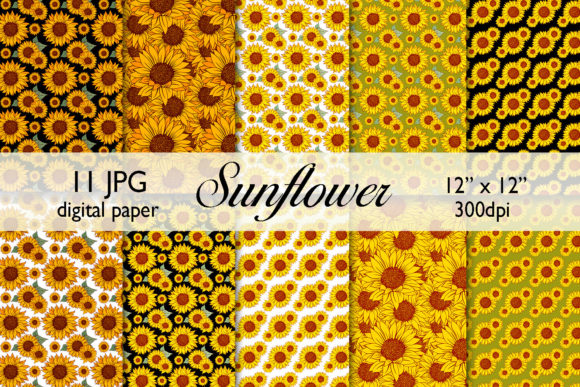
There is a distinct joy in opening a new digital asset pack, especially one as vibrant and versatile as the Sunflower Digital Paper Set. Whether you are a seasoned graphic designer, a small business owner packaging handmade soaps, or a parent planning a birthday party, high-quality textures can instantly elevate your work. This specific collection, featuring 11 JPG files at 12″x12″ and 300 DPI, offers a warm, inviting aesthetic that fits perfectly into greeting cards, invitation cards, cupcake toppers, favor tags, and label stickers. However, simply purchasing the file is only the first step. Many creators stumble not because the product lacks quality, but because they overlook critical details regarding file management, resolution usage, and pattern application. By understanding common pitfalls before you begin, you ensure your final output looks professional rather than amateurish.
Understanding the File Format and Resolution Reality
One of the most frequent misunderstandings involves the file format provided in this archive. You will receive a ZIP archive containing 11 JPG files. While JPG is a universal standard, it behaves differently than PNG or vector formats. A common mistake beginners make is assuming they can easily remove backgrounds or isolate specific sunflower elements directly from these JPG papers without losing quality. Since these are flat raster images designed as backgrounds or full-surface patterns, attempting to "cut out" elements using basic tools often results in jagged edges or halo effects. If your project requires transparent elements, you must plan your design layering carefully in software like Photoshop or Canva, treating the JPG as a base layer rather than a clip-art source.
Furthermore, the resolution specification of 300 DPI is crucial, yet often misinterpreted. This set is optimized for print projects such as scrapbooking, stationary, gift wrap, printable wall art, and posters. A significant error occurs when users resize these images significantly larger than their original 12″x12″ dimensions for large-format printing, such as a billboard or a massive banner. Stretching a 300 DPI image beyond its intended pixel dimensions causes interpolation, leading to blurriness and pixelation. To avoid this, always check the actual pixel dimensions of the file before placing it into your layout. If you need to cover a larger area, consider using the "multiply patterns" technique mentioned in the product notes, tiling the image seamlessly rather than stretching it.
The Hidden Challenge of Unzipping and File Management
The product description explicitly states: You should know how to unzip archives. While this may seem obvious to tech-savvy freelancers, it is a surprising hurdle for many hobbyists and older demographics. A frustratingly common scenario involves a customer downloading the file, trying to open the ZIP folder directly on a mobile device or within a web browser, and then complaining that the images look low-quality or won't open. Browsers and some mobile gallery apps often generate low-resolution previews of files inside a compressed folder.
To ensure you are working with the high-fidelity 300 DPI files intended for branding projects and packaging, you must extract the contents fully. On a computer, right-click the downloaded file and select "Extract All" or use a dedicated utility. On mobile devices, use the native "Files" app to unzip before importing into your design software. Skipping this step effectively downgrades your purchase, resulting in subpar prints and digital displays. Taking those extra ten seconds to properly decompress the archive guarantees you are utilizing the full value of the Sunflower Digital Paper Set.
Mastering Pattern Multiplication and Seamless Tiling
The instruction that you "can mix all elements as you want" and should know "how to multiply patterns" is an invitation to creativity, but also a warning against lazy design. A frequent oversight is using a single 12″x12″ sheet for a project that requires a larger canvas, such as web backgrounds or surface patterns for fabric, without checking the seam. Not all digital papers tile perfectly edge-to-edge. If you duplicate the image side-by-side without verifying the continuity of the sunflower stems or petals, you may end up with visible grid lines that break the immersion of your design.
Before committing to a large run of calendars or custom wrapping paper, test your tile. Create a document larger than 12 inches and place the image multiple times. Inspect the junctions where the images meet. If there is a noticeable break, you may need to use editing software to blend the edges or offset the rows to create a brick-lay pattern, which often hides seams better than a straight grid. This proactive approach saves money on wasted ink and materials, ensuring your surface patterns look continuous and professional.
Color Consistency Across Different Mediums
When utilizing these vibrant sunflower textures for both digital and physical products, color shift is a silent killer of brand consistency. The colors you see on your monitor while designing logo mockups or social media graphics will rarely match exactly what comes out of a home printer or a commercial press. A common mistake is assuming the digital proof is the final truth. For entrepreneurs selling physical goods like favor tags or sticker labels, failing to order a test print can lead to batches where the yellow appears muddy or the greens look too dark.
To mitigate this, always request a proof from your printer if ordering in bulk. If printing at home, calibrate your monitor or print a small test square on the exact paper stock you intend to use. Remember that glossy photo paper will make colors pop more than matte cardstock used for invitation cards. Understanding how your medium interacts with the ink ensures that the cheerful vibe of the sunflower theme translates accurately to the final product.
Making the Right Choice for Your Project Scope
Finally, evaluate whether this specific set matches your technical needs before buying. This Sunflower Digital Paper Set is ideal for static designs like posters, planners, and decorative accents. However, if your goal is to create animated web backgrounds or complex interactive branding projects, remember that these are static JPGs. You would need to animate them manually in video editing software, which adds time to your workflow. Additionally, because there are 11 unique files, ensure that the variety provided is sufficient for your specific campaign. If you need fifty distinct variations for a year-long calendar project, you might need to supplement this set with other textures or learn to recolor and manipulate these existing files to create new derivatives.
By approaching your download with a clear understanding of file handling, resolution limits, and pattern mechanics, you transform a simple purchase into a powerful tool for your creative arsenal. Whether you are crafting a single greeting card or launching a full product line, attention to these technical details separates the polished professional from the frustrated novice. Embrace the warmth of the sunflower aesthetic, but build your projects on a foundation of technical preparedness.